Writing prompts an AI understands the first time
My first requests to an AI looked like this: "build me a website". And I genuinely could not understand why I was getting something useless. Then I spent weeks reworking the output, getting angry, deciding the tool was half-baked.
Then it dawned on me: the problem was not the AI. The problem was that I was briefing it in a way I would never brief a human. If I had written "build me a website" to a freelancer and walked away, I would have got exactly the same thing. So let me hand you the working structure straight away.
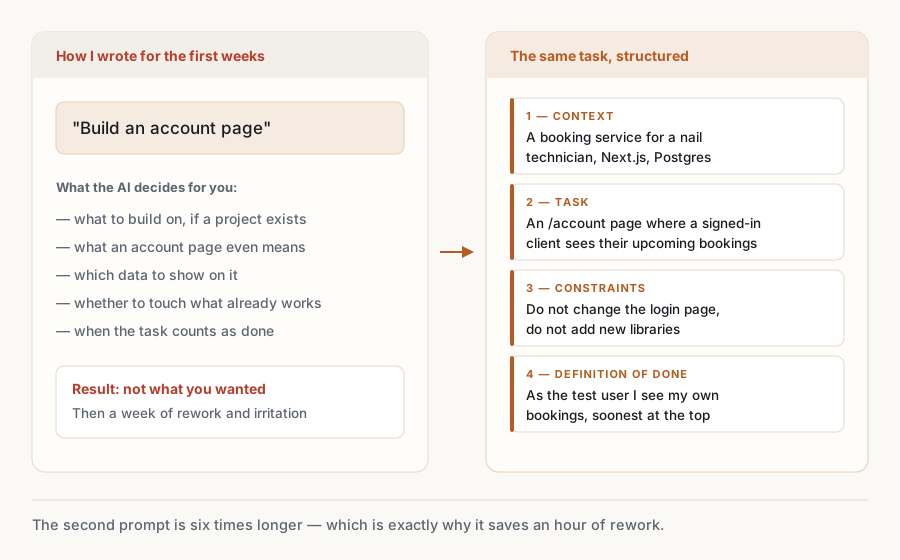
A working prompt has four parts. You do not have to write them as a numbered list, but all four must be in the text.
1. Context. What the product is, who it is for, what it is built on. "I have a booking service for nail technicians, built on Next.js, data lives in Postgres."
2. Task. What exactly needs doing, in one clear sentence. "Add a page where a client sees their upcoming appointments."
3. Constraints. What not to do and what not to touch. "Do not change the existing login page, do not add new libraries."
4. Definition of done. How you will know it worked. "Done when I sign in as the test user and see a list of my appointments sorted by date."
Compare for yourself.
Bad:
build an account page
Good:
I have a booking service for nail technicians on Next.js, data in Postgres.
Add a /account page where the signed-in client sees a list of their
upcoming appointments: date, service, technician. Soonest first.
Do not change the login page and do not add new libraries.
Done when I sign in as the test user and see my own appointments.
The second prompt is six times longer — and that is precisely why it saves you an hour of rework.
Now four official techniques from Anthropic's own documentation. I did not invent them: this is what the company behind Claude recommends (the Prompting best practices section on platform.claude.com). I am putting them in my own words, as they apply in practice.
Technique 1. Be clear and direct. Write as if briefing a new hire who is smart but knows nothing about your project. Do not hint. "I want it to look a bit nicer" is bad. "Increase the gap between cards to 24px and make the heading larger than the body text" is good.
Technique 2. Add context to improve performance. Explain not only what to do but why. The official guidance says so outright: explaining the goal improves the result. "This page is for nail technicians, they open it on a phone between clients — they need to see the schedule in two seconds." With that context the AI will make a dozen small decisions in the right direction.
Technique 3. Use examples effectively. One example is worth a paragraph of explanation. If you need a specific response format, show a finished sample. If you need a specific look, attach a screenshot: Claude Code accepts images straight into the conversation — drag them in or paste with Ctrl+V.
Technique 4. Structure prompts with XML tags. When a request contains an instruction, some data and an example, they are easy to confuse. Wrap each part in tags and the confusion disappears:
<task>
Write a letter to a client following the sample below.
</task>

<sample>
[your sample text]
</sample>

<data>
Client name: Maria, service: manicure, date: 12 May
</data>
It looks unusual, and it works noticeably better than one wall of text — and it is the officially recommended way.
A few more rules I worked out in practice.
One task, one prompt. Write "build registration, payments and an admin panel" and the AI will do all three shallowly. Ask for one and check it.
Ask for a plan before code. Claude Code has a mode for this: press Shift+Tab until the status line shows plan mode on. In the app the mode switch next to the send button does the same: choose Plan. In that mode it reads files and proposes a plan but changes nothing on disk until you agree. You read the plan in a minute and catch a wrong direction before 300 lines get written.
Show, do not retell. When something breaks, paste the whole error text, not "it throws an error".
And the most important one. Never approve a change you did not understand. If it is unclear what the proposed code does, ask: "explain in plain words what this file does and why". You are in charge here. The AI is the one doing the work.
Short questions on the material of this lesson. They count toward completion along with the homework — without them the lesson is not finished.
What is missing from this prompt: "I have a booking service on Next.js, data in Postgres. Add a page listing a client's bookings"?
Why wrap parts of a prompt in tags like <task> and <data>?
What does plan mode (Shift+Tab) do in Claude Code?
Take a task from your own product and write a prompt using the four-part structure: context, task, constraints, definition of done. Paste the whole thing here.
Write two prompts for your own product: first the way you would have written before ("build X"), then using the four-part structure — context, task, constraints, definition of done. Send both to Claude Code, one after the other, and compare. In your answer, include both prompts and describe how the results differed.
Want me to tell you when the next cohort opens? Once, on Telegram, no mailing list and nothing passed to anyone else.
Inside the course you can submit this homework for review and get feedback on every point. After it come skills, connectors, databases, payments and finding your first customers.
See the plans